Best 6 Free Instant Data Scrapers in 2026: Compared

Web Data Collection Specialist
TL;DR:
- Scrapeless is the best option when an instant extraction must grow into a repeatable web-data workflow. It gives agents search, page extraction, and browser tools through one managed MCP connection.
- Instant Data Scraper is the quickest local option for a visible table. It suits one-page exports when the page already exposes a regular row pattern.
- Web Scraper is strong for reusable browser-based sitemaps. It offers more control over navigation and selectors than a pure auto-detection extension.
- ParseHub and Octoparse suit visual desktop workflows. Their free entry points help non-developers model multi-step extraction without starting in code.
- Data Miner is useful when a shared recipe already matches the page. Its browser extension can turn repeated extraction rules into CSV or spreadsheet output.
- Free plans are evaluation surfaces, not identical products. Compare dynamic-page support, pagination, export, scheduling, privacy, and maintenance before choosing.
- Free to start. New Scrapeless accounts include free Scraping Browser runtime — sign up at app.scrapeless.com.
Best Free Instant Data Scrapers at a Glance
| Rank | Tool | Best for | Free entry point | Main tradeoff |
|---|---|---|---|---|
| 1 | Scrapeless | Agent-driven and repeatable web data | Starter credit | Managed service rather than a local extension |
| 2 | Instant Data Scraper | One-off visible tables | Free browser extension | Limited control on irregular pages |
| 3 | Web Scraper | Reusable selector and navigation maps | Free browser extension | Setup takes longer than auto-detection |
| 4 | ParseHub | Visual multi-step desktop projects | Free plan | Free runs have scope limits |
| 5 | Data Miner | Recipe-based browser extraction | Free plan | Domain and monthly limits apply |
| 6 | Octoparse | Visual workflows and templates | Free plan | Advanced automation sits in paid tiers |
The right tool depends on what “instant” means for the job. A local extension wins when one person needs one table now. A managed browser or API wins when the same extraction must run again, survive dynamic rendering, or feed an application.
What Is an Instant Data Scraper?
An instant data scraper turns page content into rows with little setup. Browser extensions usually detect repeated DOM structures, let the user adjust columns, and export CSV or spreadsheet files. Visual desktop tools add navigation, pagination, and point-and-click workflow steps. Managed services expose the same outcome through APIs or agent tools.
The output may look like a simple table, but the acquisition path matters. The HTML scripting model explains why content can appear only after scripts run. A tool that reads the initial HTML and a tool that drives a rendered browser are not equivalent on a client-rendered page.
How Do Instant Data Scrapers Work?
Most tools follow the same basic sequence:
- Load the target page in a browser or managed rendering environment.
- Detect repeated elements or accept selectors chosen by the user.
- Map text, links, images, and attributes into named fields.
- Follow pagination, scroll, or open detail pages when configured.
- Export rows or return structured data to another application.
Auto-detection works best when every record has the same visible structure. It struggles when rows are virtualized, fields are optional, content lives behind interaction, or page markup changes frequently. Selector-based and agent-driven tools require more intent up front but give the workflow clearer control.
How We Evaluated These Tools
This ranking uses six practical criteria:
- Time to first useful row. How much setup is needed before the first clean export?
- Dynamic-page support. Can the tool wait for rendered content and interact with the page?
- Multi-page control. Can it follow next-page links, scroll, or visit detail pages?
- Output quality. Are columns named, typed consistently, and easy to validate?
- Repeatability. Can the extraction be saved, scheduled, called by an agent, or embedded in a pipeline?
- Data boundary. Where do page data, credentials, and extraction rules run and persist?
CSV itself has a formal table model. The W3C tabular data model is a useful reminder that a reliable export needs stable columns, row identity, and clear handling for missing values. A file that opens in a spreadsheet is not automatically clean data.
1. Scrapeless: Best for Agent-Driven, Repeatable Extraction
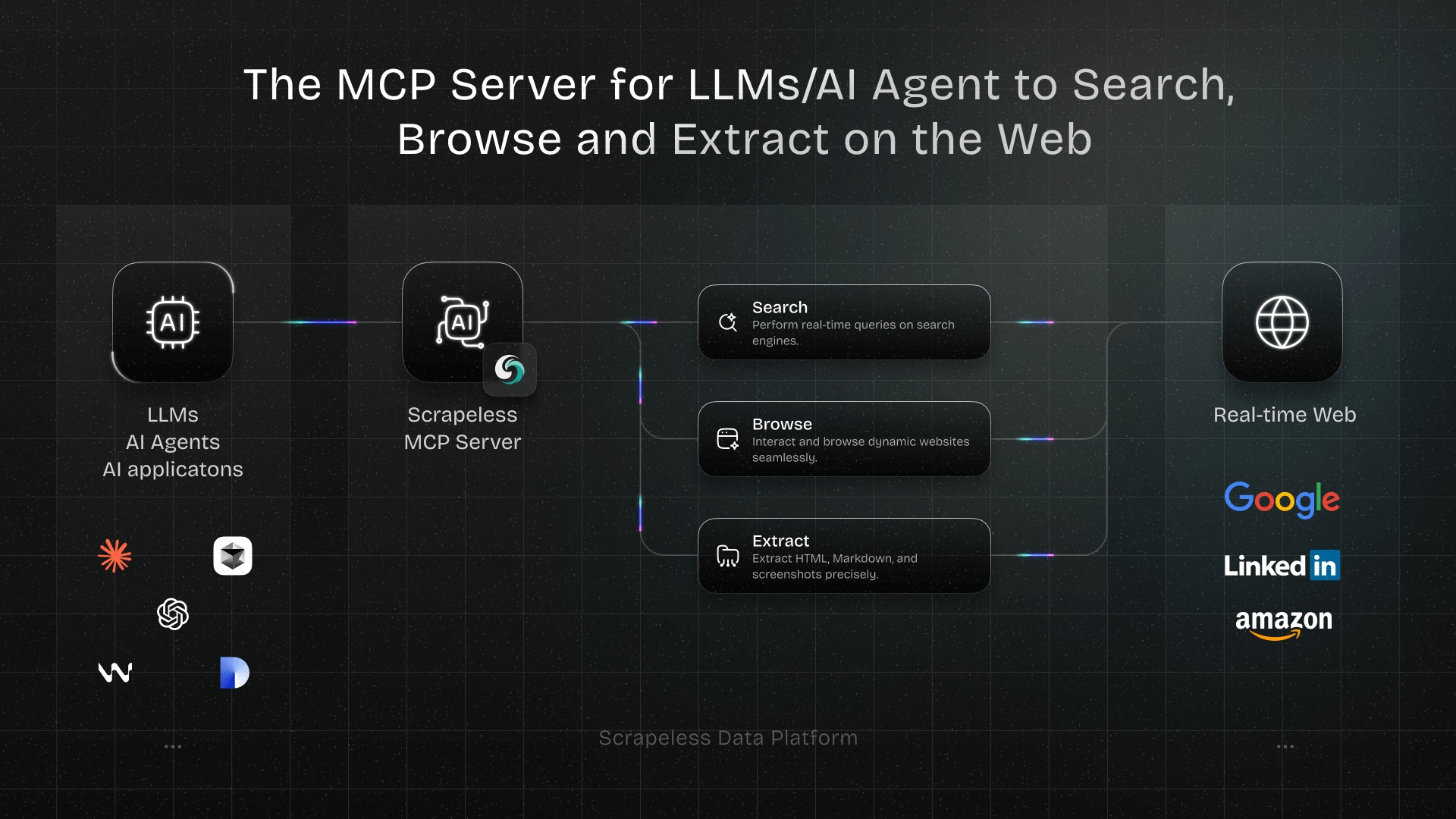
Scrapeless ranks first when the “instant” request is the start of a workflow rather than the end. Its MCP server gives an AI agent tools for search, one-shot page extraction, screenshots, and full browser interaction. The agent can inspect a page, choose the right acquisition path, and return a defined schema.
This is not a browser extension that guesses a table after one click. It is a managed web-data layer for developers and AI agents. That difference is useful when pages render with JavaScript, require navigation, or need the same extraction repeated across many URLs.
Install
Add the Scrapeless MCP server to an MCP-compatible client. This configuration requires a reader-owned SCRAPELESS_KEY from the dashboard:
jsonc
// illustrative sample: field values are not from a live commercial site
{
  "mcpServers": {
    "Scrapeless MCP Server": {
      "command": "npx",
      "args": ["-y", "scrapeless-mcp-server"],
      "env": {
        "SCRAPELESS_API_KEY": "YOUR_SCRAPELESS_KEY"
      }
    }
  }
}
How You Actually Use It: Prompt Your Agent
After the server is connected, describe the rows you need and the boundary of the job. A useful prompt names the page, fields, pagination rule, and output format:
Open the public product listing at the URL I provide. Return the first page as JSON with
name,price,rating, anddetail_url. Treat missing ratings as null. Do not open account-only pages.
The agent can inspect the page, use one-shot extraction when the content is already present, or open a browser session when rendering and interaction are required.
Worked Example
For a public listing page, the expected result should have an explicit schema. The following is an illustrative response shape, not a captured result from a specific commercial site:
jsonc
// illustrative sample: field values are not from a live commercial site
{
  "source_url": "https://example.com/products",
  "items": [
    {
      "name": "Example item",
      "price": "$24.00",
      "rating": null,
      "detail_url": "https://example.com/products/example-item"
    }
  ]
}
60-Second Smoke Test
Ask the connected agent to fetch https://example.com/ as Markdown and return only the heading and canonical URL. Accept the result only when it contains the Example Domain heading and the requested URL. This credential-gated smoke test must be run in the reader's MCP client after adding SCRAPELESS_KEY.
Scrapeless is best for teams that need a short path from an ad hoc request to a scheduled, validated, or agent-controlled data pipeline. Explore the AI Agent Browser and the guide to the Scrapeless MCP Server.
Start Scraping with Scrapeless
Power up your web scraping and automation workflow with Scrapeless!
Sign up today and get $5 in free credit — no credit card required.Claim your free credit now in the Scrapeless Dashboard.
2. Instant Data Scraper: Best for One-Off Visible Tables
Instant Data Scraper is a browser extension built around automatic pattern detection. Open a page, let the extension identify repeated rows, review the detected columns, and export the result.
It works well for visible tables and regular listing cards. The local workflow is fast and does not require a project model before the first export. The tradeoff is control: irregular layouts, hidden detail fields, virtualized lists, and complex interactions can exceed what automatic detection can infer.
Best for: researchers and operators who need a quick CSV from one regular page.
3. Web Scraper: Best for Reusable Browser Sitemaps
Web Scraper uses a sitemap model. Users define selectors and navigation relationships, then run the extraction inside the browser extension. This takes longer than one-click detection but creates a reusable map of how records, pagination, and detail pages connect.
The free browser extension is suitable for local runs. Cloud scheduling, API access, and managed execution belong to the service's paid plans. That division is easy to understand: use the extension to design and run local projects, then decide whether centralized automation is worth paying for.
Best for: users willing to learn selector-based setup in exchange for more control.
4. ParseHub: Best for Visual Multi-Step Desktop Projects
ParseHub is a visual desktop scraper. Users click page elements and add actions for navigation, forms, tabs, and scrolling. The project view makes multi-step behavior visible without requiring a programming language.
Its free plan is useful for evaluating the workflow and running bounded projects. It fits people who need more than a browser extension but still prefer a point-and-click environment. Larger runs, private projects, speed, scheduling, and managed delivery determine whether the paid tiers become necessary.
Best for: non-developers modeling interactive extraction as a visual project.
5. Data Miner: Best for Recipe-Based Browser Extraction
Data Miner uses recipes that describe which elements to extract and how to move through pages. A public recipe can shorten setup when it already matches the target. Users can also create rules for a specific layout and export the result.
The free plan provides a monthly evaluation allowance and access to recipe-based extraction. Check domain restrictions and current plan terms before choosing it for recurring work. A shared recipe saves time only while the page structure it describes remains current.
Best for: common pages with an existing recipe or teams that want reusable extraction rules inside the browser.
6. Octoparse: Best for Template-Led Visual Workflows
Octoparse combines a desktop visual builder with template-led setup. It can detect page patterns, model pagination and scrolling, and export structured results. Templates give non-technical users a useful starting point for common sites and page types.
The free plan is suitable for learning the product and running limited tasks. Cloud scheduling, larger workloads, and more advanced operational features sit beyond the basic entry point. Before adopting a template, inspect the fields and navigation steps instead of assuming they still match the current page.
Best for: operators who prefer a desktop builder and want templates to shorten initial setup.
Side-by-Side Comparison
| Tool | Local or managed | Dynamic interaction | Multi-page model | Automation path | Best starting point |
|---|---|---|---|---|---|
| Scrapeless | Managed | Full browser tools | Agent- or code-directed | MCP and APIs | Prompt with explicit fields |
| Instant Data Scraper | Local extension | Basic page behavior | Detected pagination | Manual local run | Open a regular table page |
| Web Scraper | Local extension, optional cloud | Selector-driven | Sitemap relationships | Paid cloud plans | Build selectors and a sitemap |
| ParseHub | Desktop with managed runs | Visual actions | Project workflow | Paid scheduling and API | Click fields and navigation steps |
| Data Miner | Browser extension | Recipe-dependent | Recipe and next-page rules | Paid crawl features | Find or create a recipe |
| Octoparse | Desktop and cloud | Visual actions and templates | Workflow steps | Paid cloud plans | Start from detection or a template |
How Do You Pick the Right Tool?
Choose based on the first constraint that can break the job:
- Use an auto-detection extension when the page is regular, visible, and needed once.
- Use a sitemap or recipe tool when the same structure will be collected repeatedly by one operator.
- Use a visual desktop scraper when the workflow contains clicks, pagination, and several page types.
- Use Scrapeless when the extraction must feed code or an agent, run against dynamic pages, or scale beyond a person's browser.
Review browser-extension permissions before installing any scraper. The Chrome Web Store user-data guidance explains how extension developers must disclose collection and use of user data. Prefer the narrowest permissions that support the target pages, and avoid placing sensitive account data in a scraping workflow without a clear policy.
Common Use Cases for Instant Data Scrapers
- Product research. Collect visible names, prices, ratings, and URLs for analysis.
- Directory cleanup. Turn public listings into rows for deduplication and enrichment.
- Content inventory. Capture titles, dates, authors, and canonical links from a section page.
- Job and market research. Structure public roles, locations, and posting URLs.
- Quality checks. Compare page output with a source catalog or expected schema.
- AI context preparation. Convert current public pages into bounded, traceable inputs for an agent.
Use only public information you are authorized to collect. Respect site terms, technical access controls, privacy obligations, and limits appropriate to the target and purpose.
Why Is Instant Web Data Hard to Extract Reliably?
Fast setup hides several technical problems. Client-side rendering can leave the initial HTML empty. Virtualized lists may remove rows that scroll out of view. Infinite scroll changes the stopping condition. Optional cards create uneven schemas. Localized pages change currency, language, and field names. Markup changes can invalidate selectors without producing an obvious error.
HTTP behavior also matters. The HTTP semantics specification distinguishes successful responses from redirects, errors, and content negotiation. A scraper should validate the final URL and expected content instead of treating any response body as a successful extraction.
The practical answer is to test the smallest representative page, define the output schema, and check missing fields before scaling. The fastest tool is the one that returns usable rows with the least correction, not the one that opens first.
Conclusion: match the tool to the life of the data
Free instant data scrapers cover several distinct jobs. Browser extensions are excellent for quick local tables. Sitemap, recipe, and visual desktop tools add repeatability without requiring code. Scrapeless is the strongest fit when the result must move into an agent, API, or production workflow.
Start with one representative page and a written schema. Confirm how the tool handles rendering, pagination, missing values, and exports. Then choose the lightest option that still supports the expected life of the data.
Ready to Turn a Quick Extraction Into a Data Workflow?
Join the Scrapeless Discord community or Telegram community, compare current pricing, and use the Scrapeless documentation to connect your first agent-driven extraction.
FAQ
Q: What is the best free instant data scraper for beginners?
Instant Data Scraper is the easiest starting point for a regular visible table. ParseHub and Octoparse provide more visual control when the job includes navigation or several page types.
Q: Which instant data scraper is best for AI agents?
Scrapeless is the strongest fit in this list because it exposes search, extraction, and browser capabilities through MCP and APIs rather than requiring a person to operate an extension.
Q: Can a free scraper handle JavaScript pages?
Some can, but support varies. Browser-based and visual tools can see rendered content, while interaction, scrolling, and session requirements may still exceed a free plan or simple detector.
Q: Can instant data scrapers follow pagination?
Many support next-page links or scrolling. Verify the stopping rule and inspect the final row count because auto-detected pagination can miss irregular transitions.
Q: Is it legal to use an instant data scraper?
Web scraping rules depend on the target, data, jurisdiction, contract terms, and purpose. Collect only public information you are authorized to use and obtain legal advice for sensitive or commercial workflows.
Q: How should scraped CSV files be validated?
Check column names, required fields, duplicates, missing values, final URLs, encoding, and a sample of rows against the rendered page before using the file downstream.
At Scrapeless, we only access publicly available data while strictly complying with applicable laws, regulations, and website privacy policies. The content in this blog is for demonstration purposes only and does not involve any illegal or infringing activities. We make no guarantees and disclaim all liability for the use of information from this blog or third-party links. Before engaging in any scraping activities, consult your legal advisor and review the target website's terms of service or obtain the necessary permissions.